
ERP Maintenance Module : NPEPS25Trg01A03
GO BACK TO Main Topic
A) https://hamradio.my/2024/06/sap-revolutionizing-business-software/
B) https://www.lmteq.com/blogs/sap/evolution-of-sap-and-its-different-versions-sap-r-3-s-4hana/
Introduction to ERP
https://www.geeksforgeeks.org/introduction-to-erp
Last Updated : 13 Jun, 2024
ERP stands for Enterprise Resource Planning. ERP systems are the kind of software tools that are used to manage the data of an enterprise. It helps different organizations deal with different departments of an enterprise. Different departments like receiving, inventory management, customer order management, production planning, shipping, accounting, human resource management, and other business functions. This article focuses on discussing an ERP system in detail.
Table of Content
- What is ERP?
- Features of ERP
- History of ERP
- Why ERP is Important?
- How does ERP Work?
- Types of ERPs
- Benefits of ERPs
- Weakness of ERPs
- ERP vs CRM
- ERP Solution Providers
- Tips for Choosing an ERP
- Conclusion
- FAQs
What is ERP?
What is ERP?
Enterprise Resource Planning (ERP) is a software system that is used by organizations to manage and integrate the important parts of the businesses. It is the practice of consolidating an enterprise’s planning, manufacturing, sales, and marketing efforts into one management system.
- It can integrate all the processes that are needed to run a company.
- It helps to improve efficiency, better reporting, and enhanced data security.
- These systems can be customized according to the specific needs of the different industries.
- ERP systems are crucial for large organizations.
Figure – Before ERP
Before ERP
Before an ERP system, there were different databases of different departments which they managed on their own. The employees of one department does not know anything about the other department.
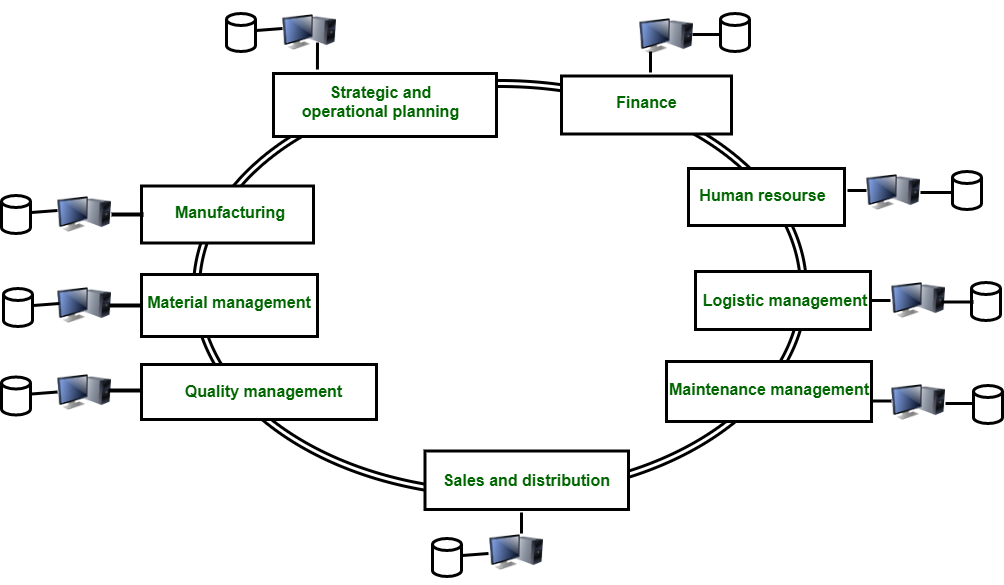
Figure – After ERP
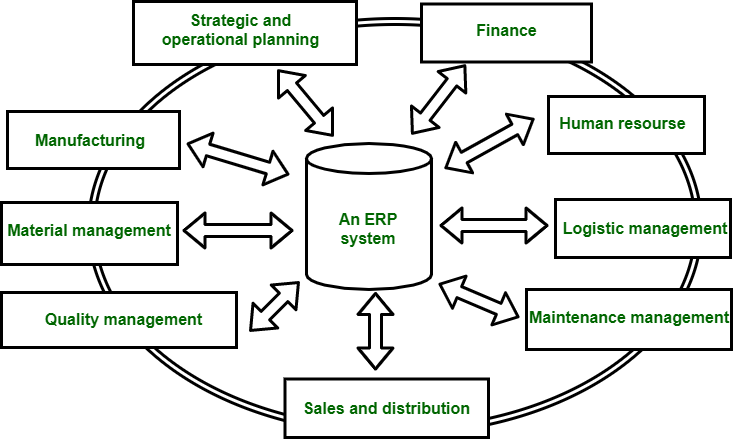
After ERP
After the ERP system, databases of different departments are managed by one system called the ERP system. It keeps track of all the databases within the system. In this scenario, employees of one department have information regarding the other departments.
An ERP (Enterprise Resource Planning) Maintenance Management System module is a software module within an ERP system that helps organizations manage and optimize their asset maintenance activities. It integrates with other ERP modules to provide a comprehensive view of asset lifecycle management, from procurement to disposal, and includes functions for planning, scheduling, and executing maintenance tasks. [1, 1, 2, 2, 3, 3, 4, 4, 5]
Here’s a more detailed explanation:
- Asset Management: Keeps track of all assets, including equipment, machinery, and facilities, with details like serial numbers, location, purchase date, and maintenance history. [4, 4, 6]
- Maintenance Planning: Facilitates the creation of preventive maintenance schedules, inspections, and work orders. [4, 4, 7, 7]
- Work Order Management: Allows for the creation and tracking of work orders, including assigning tasks, scheduling, and managing resources. [4, 4, 7, 7, 8, 9]
- Inventory Management: Manages spare parts and materials needed for maintenance, including ordering, receiving, and tracking inventory levels. [4, 4, 7, 7, 10, 11, 12, 13, 14]
- Reporting and Analysis: Provides reports and dashboards on maintenance performance, costs, downtime, and other key metrics. [4, 7, 7, 15, 15]
- Integration: Integrates with other ERP modules like finance, purchasing, and supply chain to provide a unified view of the organization’s operations. [3, 3, 7, 7]
Benefits of using an ERP Maintenance Management System: [4, 7, 15, 16]
- Reduced Downtime: By implementing preventive maintenance and proactive scheduling, businesses can minimize downtime and ensure equipment reliability. [4, 4, 7, 7]
- Lower Maintenance Costs: Optimized maintenance planning and inventory management can reduce overall maintenance costs. [4, 4, 7, 7]
- Improved Asset Lifecycle Management: The module provides a complete view of asset lifecycle, from procurement to disposal, allowing for better decision-making. [4, 4, 7, 17, 18, 19, 20, 21]
- Enhanced Efficiency: Streamlined processes and automated tasks improve efficiency and reduce administrative overhead. [4, 4, 7, 7, 22, 23, 24]
- Better Decision-Making: Reports and dashboards provide insights into maintenance performance, allowing for better decision-making and continuous improvement. [7, 7, 15, 15, 25, 26, 27, 28]
Imagine a manufacturing plant using an ERP system with a maintenance module. This module would help manage all the plant’s equipment, including machinery, tools, and vehicles. The module would allow for: [4, 4, 7, 7, 15, 29, 30]
- Creating a preventive maintenance schedule for each piece of equipment, including inspections and servicing. [4, 4, 7, 7]
- Assigning work orders to technicians when equipment needs repairs or replacements. [4, 7, 31, 32, 33]
- Tracking spare parts and materials needed for maintenance, including ordering and inventory levels. [4, 4, 7, 7]
- Generating reports on maintenance costs, downtime, and equipment performance. [4, 7, 15, 34]
By using the maintenance module, the manufacturing plant can ensure that its equipment is running efficiently and that maintenance costs are minimized.
Generative AI is experimental.
[1] https://cag.gov.in/uploads/media/PC-03-ERPOerview-ICAI-20210331115403.pdf
[2] https://www.oracle.com/in/erp/what-is-erp/
[3] https://www.sap.com/sea/products/erp/what-is-erp.html
[4] https://www.focussoftnet.com/equipment-maintenance-management-erp-software
[5] https://www.centerpoint.pro/modules/maintenance-module
[6] https://www.gofmx.com/cmms/
[7] https://www.lighthouseindia.com/erp-software-for-plant-maintenance.html
[8] https://www.focussoftnet.com/in/equipment-maintenance-management-erp-software
[9] https://www.inecta.com/blog/everything-you-need-to-know-about-maintenance-repair-and-operations-mro
[10] https://www.geniuserp.com/resources/blog/beginner-guide-manufacturing-erps/
[11] https://tallysolutions.com/erp-software/types-of-erp-software-system/
[12] https://www.linkedin.com/pulse/ins-outs-maintenance-management-software-factana
[13] https://link.springer.com/chapter/10.1007/978-3-030-74154-9_4
[14] https://blog.intraratio.com/integrations-erp-mes
[15] https://www.eresourceerp.com/blogs/plant-maintenance-module-in-erp/
[16] https://www.netsuite.com/portal/resource/articles/erp/erp-maintenance.shtml
[17] https://ordersinseconds.com/what-is-an-erp-system-and-why-is-it-important-for-your-business/
[18] https://servicechannel.com/blog/maintenance-management-essentials-for-peak-facility-performance/
[19] https://www.assetinfinity.com/blog/why-integrate-asset-management-system-with-existing-erp
[20] https://www.synconics.com/odoo-opensource-erp-for-utilities-industry
[21] https://www.hashmicro.com/ph/blog/benefits-of-asset-management-software/
[22] https://www.sap.com/hk/products/erp/what-is-erp.html
[23] https://llumin.com/the-complete-guide-to-erp-vs-eam/
[25] https://buildops.com/resources/computerized-maintenance-management-system-modules/
[26] https://www.unleashedsoftware.com/blog/erp-inventory-management-system/
[27] https://www.fieldcircle.com/articles/cmms-integration/
[28] https://www.clickmaint.com/industries/cmms-software-for-construction-equipment-maintenance
[29] https://www.cybrosys.com/blog/erp-system-for-automotive-industry
[30] https://fit.ae/pmv-management/
[31] https://www.focussoftnet.com/in/equipment-maintenance-management-erp-software
[32] https://propelapps.com/blog/mobile-enterprise-asset-management/work-orders/
[33] https://www.konsultoo.com/mrp-software
[34] https://factech.co.in/blog/how-facility-erp-system-is-transforming-building-maintenance/
Not all images can be exported from Search.
==========
Features of ERP
Below are the core features of ERP systems:
- Financial Management: ERP systems are used to manage financial transactions, produce financial statements such as balance sheets, manage companies’ tangible and intangible assets, and track money owned by and to the organization.
- Supply Chain Management: ERP systems help to monitor the stock levels, track inventory movement, manage the movement of goods, and automate the purchasing process.
- Human Resources: In an organization, ERP systems help to manage employee records, automate payroll processing, and manage recruitment and onboarding.
- Customer Relationship Management (CRM): ERP systems help in sales automation, automate marketing campaigns, track customer interactions, and improve customer satisfaction.
- Project Management: ERP systems support project planning and scheduling, and monitor project time and expenses for accurate cost estimation.
- Manufacturing: ERP systems help in production planning, list all the raw materials required for product manufacture, and monitor the production process.
History of ERP
| Timeline | Key Development | Description |
|---|---|---|
| 1960s | Beginnings | Material Requirements Planning (MRP) systems were introduced that were focussed on inventory management and production planning. |
| 1970s | MRP Expansion | Material Requirements Planning (MRPII) is introduced with a few additional manufacturing processes added to MRP such as capacity planning, shop floor control, and quality management. |
| 1980s | Introduction of ERP | This era marks the introduction of ERP which integrated various business functions like finance, HR, and procurement into a single system. Relational Databases were introduced that improved data storage and retrieval. |
| 1990s | Growth and Adoption | In this era there was a shift from Mainframe to Client-Server Architecture. ERP systems became more customizable. |
| 2000s | Web-based ERP | ERP systems enabled remote access and cloud-based solutions. Emergence of SaaS ERP solutions offered lower initial costs and easier maintenance. |
| 2010s | Cloud and Mobile ERP | There was widespread adoption of cloud-based ERP solutions. Mobile apps and mobile-friendly ERP interfaces were introduced. |
| 2020s | Intelligent ERP | Integration of AI and ML in ERP systems for predictive analysis and enhanced decision-making. Introduction of Blockchain Technology in ERP transactions enhanced security and transparency of the transactions. Use of IoT devices in ERP systems for real-time data collection and monitoring. |
Why ERP is Important?
Why ERP is Important?
ERP systems are critical for modern businesses and organizations. Below are some of the points highlighting why ERP systems are important:
- Reduces Manual Work: ERP systems help to reduce manual work, thus freeing up employees for more strategic activities.
- Improved Efficiency: These systems help to improve efficiency by integrating different business processes and ensuring smooth operations.
- Up-to-Date Information: ERP systems provide real-time data enabling timely and improved decisions.
- Fosters Collaborations: These systems ensure that all the teams work on the same data thus reducing misunderstandings.
- Reduces Operational Costs: They help in cost saving by streamlining the processes and improving productivity.
- Intergates CRM: ERP systems help to manage customer interactions and improve satisfaction.
- Tracks KPIs: ERP systems allow for better performance management by tracking KPIs and other metrics.
How does ERP Work?
ERP systems typically work through a centralized database by integrating various business processes and functions into a unified system.
1. Centralized Database
An ERP system stores all the data in a central database and ensures that all the users have access to the most current data. This helping different departments to access and share information seamlessly, thus helps them to make informed decisions.
2. Modular Structure
ERP systems are composed of interconnected modules, focussing on specific business functions allowing data to flow between them.
3. Business Process Integration
ERP systems automate workflows across various departments and support end-to-end business processes, ensuring all the steps are streamlined.
4. User Interface and Access
In ERP systems users have specific roles and permissions according to which they are granted access to relevant modules. They are also provided with dashboards and reporting tools to monitor KPIs.
5. Customization
ERP systems are customized according to the specific needs of the organization. It also allows for adjustments when the business grows ensuring ERP systems remain aligned with the business goals.
6. Data Collection and Analytics
ERP systems capture data from various sources and use built-in analytics tools to process data and generate actionable insights helping businesses to make strategic decisions.
7. Compliance and Security
ERP systems ensure that all business processes comply with relevant regulations and standards and implement robust security measures to protect sensitive data.
8. Implementation and Training
This involves planning, configuring, testing, and deploying the ERP systems. It also involves conducting training programs to ensure all users are proficient in using ERP systems.
Types of ERPs
| ERP Type | Description | Benefits | Drawbacks |
|---|---|---|---|
| On-Premise ERP | ERP system is installed locally on companies’ servers and hardware. | This is highly customizable and provides greater control over data. | This ERP system has high maintenance costs and IT infrastructure requirements. |
| Cloud ERP | ERP system is hosted on vendor’s servers and accessed via the internet. | This ERP system is scalable, low upfront cost, and accessible from anywhere. | Cloud ERP provides less control over data security and relies on internet connectivity. |
| Hybrid ERP | Hybrid ERP combines On-Premise and Cloud ERP features. | This provides flexibility to use both on-premise and cloud functionalities. | Hybrid ERP is costly and complex to integrate and manage due to dual systems. |
| Open-source ERP | Open-source ERP systems have code available to the public, thus allowing for customization. | They are highly customizable and cost-effective. | They require technical expertise for implementation and maintenance. |
| Industry-specific ERP | Industry-specific ERP are tailored to meet the specific needs of particular industries. | They offer specialized functionalities and compliance with industry standards. | They are less flexible to adapt to different industries and are costly to customize. |
| Small Business ERP | These are designed for small medium-sized businesses. | They are affordable and easy to use. | They offer limited features and scalability. |
| Enterprise ERP | These are the comprehensive ERP systems that are designed for large organizations. | They offer extensive functionalities and advanced customization. | They are costly, complex to implement, and longer deployment time. |
| Best-of-Breed ERP | Best-of-Breed ERP systems combine the best modules from different ERP vendors. | They offer the flexibility in choosing the preferred solutions. | They pose integration challenges and higher costs due to multiple vendors. |
| Two-Tier ERP | It utilizes the primary ERP at the corporate level and the secondary ERP at the departmental level. | It offers cost savings for smaller units. | They pose integration complexity between tiers, thus causeing potential data consistency issues. |
Benefits of ERPs
Here are the key benefits of implementing the ERP systems:
- Improved Efficiency: ERP systems reduce the manual effort and risk of errors by automating repetitive processes.
- Integrated Business Processes: ERP systems streamline operations by integrating various business processes and enable seamless data flow across the departments.
- Reduced Redundancy: ERP systems eliminate duplicate data entries and improve data integrity.
- Timely Data Access: ERP systems provide real-time data access, thus helping in making timely and informed decisions.
- Reduced IT Costs: ERP systems consolidate IT systems, thus lowering the infrastructure and maintenance costs.
- Maintain Compliance: It help to maintain compliance with industry standards.
- Enhances Customer Service: ERP systems helps to improve service delivery by providing quick access to customer information and data.
Weakness of ERPs
ERP systems offer numerous benefits but they also come with several weaknesses and challenges. Here are some of the weaknesses of ERP systems:
- High Implementation Costs: Implementing an ERP system can be expensive and time-consuming. It requires significant investment in hardware, software, and personnel, as well as training and consulting costs.
- Complex Customization: Customizing an ERP system to meet the specific needs of an organization can be complex and require specialized knowledge. This can lead to delays and additional costs.
- Resistance to Change: ERP systems often require significant changes to an organization’s processes and workflows, which can be met with resistance from employees who are comfortable with existing practices.
- Data Security Risks: Centralizing sensitive business data in an ERP system creates potential security risks, especially if the system is not properly secured or if there are vulnerabilities in the software.
- Limited Flexibility: ERP systems are designed to provide standardization and control, which can limit the flexibility of an organization to respond to changing business needs and market conditions.
- Dependence on Vendor Support: Organizations that use ERP systems are often heavily dependent on the vendor for support, maintenance, and upgrades. This can create a risk of vendor lock-in and limit an organization’s ability to switch to other systems or providers.
ERP vs CRM
ERP and CRM are both software systems that serve different purposes and manage different aspects of a business. Below are some of the differences between them:
| Features | Enterprise Resource Planning (ERP) | Customer Relationship Management (CRM) |
|---|---|---|
| Definition | ERP integrates and automates essential business processes across various departments. | CRM manages and improves the interactions with current and potential customers. |
| Data | ERP has a central database for internal operations. | CRM has centralized customer data and interaction history. |
| Ideal For | ERP is ideal for organizations needing to integrate and automate multiple business processes. | CRM is ideal for organizations focussing on improving customer interactions. |
| Customization | Customization can be complex and expensive. | Customization is generally easier and straightforward. |
| Training Requirement | ERP systems require extensive training for various modules. | CRM requires less extensive training. |
| Scalability | ERP systems are scalable but require significant investment. | CRM is scalable but with less complexity. |
| Benefits | ERP systems offer various benefits such as improved efficiency, informed decision-making, data accuracy, and many more. | CRM systems offer various benefits such as enhanced customer relationships, improved customer service, and many more. |
| Example | Financial Reporting, Inventory Management, HR Payroll Processing. | Sales Tracking, Customer Support, Email Marketing Campaigns. |
ERP Solution Providers
Here are some of the leading ERP solution providers:
- SAP: SAP offers a variety of products SAP S/4HANA and SAP Business One and offers features like financial management, supply chain management, and human resources. The target market is large enterprises and small to mid-sized businesses.
- Oracle: Oracle offers products like Oracle ERP Cloud and Oracle NetSuite. These products offer features such as financial management, project management, and supply chain management.
- Microsoft: Microsoft offers Microsoft Dynamics 365 ERP Solution. It offers features such as Finance, Operations, Retail, Human Resources, and Customer Service Modules. The target market of Microsoft Dynamics 365 is small to large enterprises.
- Epicor: Epicor offers products Epicor ERP and Epicor Kinetic. It offers services such as financial management, supply chain management, and human resources.
- IFS: IFS offers products like IFS Applications and IFS Cloud. It offers services such as Enterprise asset management, project management, and supply chain management. The target market is large enterprises, particularly in asset-intensive industries such as aerospace, defense, and energy.
Tips for Choosing an ERP
Here are some tips to help choose the right ERP system for the organization:
- Assess Business Needs: Determine functionalities that the business needs such as financial management, supply chain, manufacturing, etc.
- Understand Challenges: Understand the current challenges in existing processes that an ERP should address.
- Engage Stakeholders: Engage stakeholders from different departments to make sure that ERP meets diverse needs across the organization.
- Set a Budget: Consider upfront costs and ongoing costs and create a total budget.
- Customization: Evaluate the system’s ability to be customized to fit specific business processes.
- Availability of Vendor Support: Assess the availability of vendor support including training, customer service, and technical assistance.
- Availability of Training Materials: Check the availability of training materials and documentation to help users quickly adapt to the new system.
Conclusion
In today’s rapidly evolving business landscape ERP systems emerge as a powerful solution that seamlessly integrate various business processes into a unified platform. They enable organizations to streamline operations, reduce costs, and make informed decisions. Implementing ERP systems not only improves customer satisfaction but also strengthens data security and regulatory compliance.
An ERP Maintenance Management module is a specialized software component within an ERP system that focuses on managing the maintenance of an organization’s assets. It helps automate and streamline processes related to work order creation, assignment to technicians, tracking, and maintenance scheduling. This module often integrates with other ERP modules like Production Planning, Procurement, and Inventory Management to provide a comprehensive view of maintenance activities and their impact on business operations. [1, 2, 3]
Here’s a more detailed breakdown of what an ERP Maintenance Management module typically offers:
Core Functionality: [1, 1, 2, 2]
- Work Order Management: Creation, assignment, and tracking of work orders for both preventive and corrective maintenance. [1, 1, 2, 2]
- Asset Management: Tracking of equipment, machinery, and other assets, including their maintenance history and performance. [2, 2, 3, 3]
- Maintenance Scheduling: Planning and scheduling of maintenance tasks, including preventive maintenance checks. [2, 2, 3, 3]
- Cost Tracking: Monitoring and recording the costs associated with maintenance, including labor, materials, and third-party contractors. [2, 2]
- Inventory Management: Integration with inventory modules to manage spare parts and other maintenance-related materials. [2, 2]
- Reporting and Analytics: Generating reports and dashboards to analyze maintenance performance and identify areas for improvement. [1, 2, 2, 3, 3, 4]
Benefits of Using an ERP Maintenance Management Module: [1, 1, 2, 5]
- Improved Efficiency: Streamlined workflows and reduced manual tasks lead to faster and more efficient maintenance operations. [1, 1, 2, 2]
- Reduced Downtime: Better maintenance planning and scheduling minimize equipment downtime and production disruptions. [2, 2, 3, 3, 6, 7, 8, 9]
- Lower Costs: Improved cost control and resource allocation lead to significant cost savings. [2, 2]
- Enhanced Asset Management: Better tracking and management of assets, leading to increased asset lifespan and value. [1, 2, 2, 3, 3, 10]
- Better Compliance: Facilitates compliance with industry regulations and safety standards. [2, 2, 3, 3, 11, 12, 13]
Example ERP Systems with Maintenance Modules:
SAP ERP, Oracle ERP Cloud, NetSuite ERP, Focus Softnet, and Finsys ERP Software. [1, 2, 14, 15, 16]
Generative AI is experimental.
[1] https://www.focussoftnet.com/in/equipment-maintenance-management-erp-software
[2] https://finsys.co.in/solutions/erp-software-for-maintenance
[3] https://www.eresourceerp.com/blogs/plant-maintenance-module-in-erp/
[4] https://www.youtube.com/watch?v=yB2Oqc66TFM
[5] https://texamserp.com/plant-maintenance.html
[6] https://www.focussoftnet.com/in/equipment-maintenance-management-erp-software
[8] https://www.centerpoint.pro/modules/maintenance-module
[9] https://www.datanote.in/products/erp/maintenance
[10] https://softengine.com/cost-savings-breakdown-how-erp-systems-can-reduce-operational-costs/
[11] https://www.hashmicro.com/my/blog/erp-modules/
[12] https://www.eresourceerp.com/blogs/manufacturing-erp-software/
[13] https://icicletechnologies.com/preventative-maintenance-management-for-food-processing/
[14] https://www.focussoftnet.com/equipment-maintenance-management-erp-software
[15] https://www.zanovoy.com/modules/netsuite-quality-management
[16] https://outgoing.more4apps.com/permanent/ERP%20Cloud%20Projects%20Module%20User%20Guide.pdf